How to make the perfect salon website: what clients check before they book
A salon website fills the diary when a new client can see your prices, look at real work by the person who'd do theirs, check you're close by and open when they're free, then book in a couple of taps without phoning. Reviews, Instagram and local search all matter, but they work by sending people to those five things.
What do clients check before they book a salon?
- The price. Can they afford a full head of highlights here, or is it a special occasion place.
- The work. Photos of cuts, colour, nails or brows that look like what they want.
- The person. Who would do it, and whether that person is good at their hair type or their style.
- The practical bits. Where you are, where to park, what hours you keep.
- The booking. Whether they can grab a Thursday evening slot right now.
This holds for hair, beauty, nail and barber shops alike. Most clients run through the list on a phone, often straight from Instagram or Google Maps, and if one answer is missing they go back to the search results rather than ring to ask. That list is the brief for any salon site, whether you build it yourself or have a hand-built website made.
Which booking system should a UK salon use?
Most UK salons use one of a handful of platforms. All five below take bookings online and can take deposits or charge for no-shows, on some plans at least. The big difference is how they charge, especially for new clients who find you through the platform's own marketplace.
| Platform | How it charges (at the time of writing, before VAT) | Worth knowing |
|---|---|---|
| Fresha | £14.95 a month for one person, or £9.95 a month per team member | One-off 20% fee (minimum £4) on new marketplace clients. Free through your own website, Instagram or Facebook. |
| Treatwell | From £9.99 a month; deposits come with the £59 Expert plan | 35% plus VAT, once, on a new marketplace client. 0% through your website and social media. |
| Booksy | £40 a month, plus £5 a month per extra team member | Marketplace included. Optional Boost charges a one-off 30% (minimum £5) for clients it brings. Reserve with Google included. |
| Phorest | Priced by quote | Aimed at salons with three or more staff. Reserve with Google on its top plan. |
| Timely | Paid plans; online deposits and cancellation fees cost 1.85% + 30p each | Reserve with Google integration. |
Sources: Fresha pricing; Treatwell partner pricing; Booksy UK pricing; Phorest pricing; Timely pricing.
None of these is the wrong choice. A marketplace is a good way to fill quiet chairs. Pick the one whose charges suit how you get clients, then use its direct booking link on your website. On the platforms that charge for marketplace clients, a booking through your own link generally doesn't carry that fee, so clients your website brings in cost nothing extra. Check your platform's rules on what counts as a new marketplace client.
Where should the booking button go?
- On every page. In the header on a computer, and fixed to the bottom of the screen on a phone, so it's always one tap away.
- On each service and each stylist. If your platform gives you a link that opens straight on a service or a team member, use it. "Book a cut with Jade" beats making the client start again.
- Straight to the calendar. Never to a contact form or a page that asks them to phone.
It's the same idea that runs through our guide to making a website convert: one main action, always one tap away.
How should you handle deposits and no-shows?
No-shows hurt most on long appointments such as colour, extensions and full sets, so that's where most salons ask for a deposit. Put the policy in plain words on the price list and the booking page, so nobody meets it for the first time at the payment step. Something like: "We take a deposit for colour appointments, which comes off your bill on the day. You can move or cancel up to 48 hours before at no cost. Later than that, the deposit covers the time we held for you." State the actual deposit amount and notice period, and keep the wording identical to the settings in your booking system.
What should a salon price list look like?
- Real text on a web page. Not a photo of the menu by the till, and not a PDF. Text reads properly on a phone, and Google can read it.
- Grouped the way clients think. Cuts, colour, treatments, nails, brows and lashes, with how long each takes.
- "From" prices explained. If the price depends on hair length or the stylist's level, say so. A small table with columns for junior, stylist and senior stylist does this well.
- Consultations for the tricky jobs. Colour corrections are hard to price blind, so make a consultation bookable.
Do stylist profiles, a portfolio and reviews make a difference?
Yes. Clients book people. A good profile has a real photo, what they specialise in (curly cuts, blonding, fades, nail art), their level, the days they work and a button to book them.
The portfolio should be your own work and nothing else. For before and after shots, use the same light and angle both times, label each with the service and who did it, and ask the client's permission before posting. Group the gallery by service, so someone after balayage doesn't wade through 40 photos of beards.
Reviews work best next to the thing they praise: a review of Jade's curly cuts on Jade's profile, a review of a lash lift on the lashes page. Link to your full Google reviews, and ask happy clients in person, then send the link in your thank-you text.
What should you say about patch tests and aftercare?
The National Hair and Beauty Federation's guidance is that an allergy alert test, often called a patch test, should be done at least 48 hours before the service, because a reaction can take up to 48 hours to develop. Say so on the colour and booking pages, and make the test bookable online as a short appointment. A new client who finds out at the door has to go home and come back, and some won't.
Aftercare pages earn their place too. A short page on looking after a new colour, gel nails or a lash lift saves you answering the same messages. For the routine questions that still arrive by phone, our post on how an AI receptionist works explains one way to answer them out of hours.
Sources: NHBF, FAQs on allergy alert testing protocols (2025).
Which practical details do clients look for?
- The full address with a map, and which door or floor if you're above a shop.
- Parking: the nearest car park, whether the street is pay and display or permit only, and the nearest bus stop.
- Step-free access, or an honest note if there are stairs.
- Opening hours that match your Google Business Profile exactly, including late nights.
- For barbers: whether you take walk-ins, and when the queue is shortest.
How do you get bookings straight from Google?
Google lets clients book from your Business Profile in two ways. The first is booking through a provider, usually called Reserve with Google: in your profile, open Bookings, choose Get started and pick your provider. Google says it appears within a week, and warns that the provider may charge you for bookings made through Google, so check first.
The second is adding your own booking link. Your business must be verified, the link must go to a page where the client can actually book, and social media links aren't allowed.
Sources: Google Business Profile Help, set up bookings through a provider; Google Business Profile Help, local business links.
Photos, categories and reviews on the profile itself are covered in our Google Business Profile guide.
How do you show Instagram without slowing the site?
It's tempting to pull your whole Instagram feed onto the home page. But each embedded post loads Instagram's own code, and a grid of them is a lot for a phone to download and run. Two lighter options work better:
- Add eight or so of your best recent photos as normal compressed images, with a link to your profile underneath.
- If you want a live feed, load it only when the visitor scrolls down to it.
More on images and scripts in our post on why websites are slow.
How does a salon show up for "balayage Clapham"?
People search for the service and the place: "balayage Clapham", "gel nails Leeds", "skin fade Exeter". Give each main service its own page, with its price, photos of that work and the town in the title and heading. One "Services" page can't rank for all of them.
Keep your name, address and phone number identical on the website, Google and your booking platform. Two branches get a page each, with their own address, hours and team. Don't copy one page and swap in different town names: Google's spam policies treat pages aimed at different towns that funnel to the same place as doorway pages.
Sources: Google Search Central, spam policies.
What does a good salon website look like?
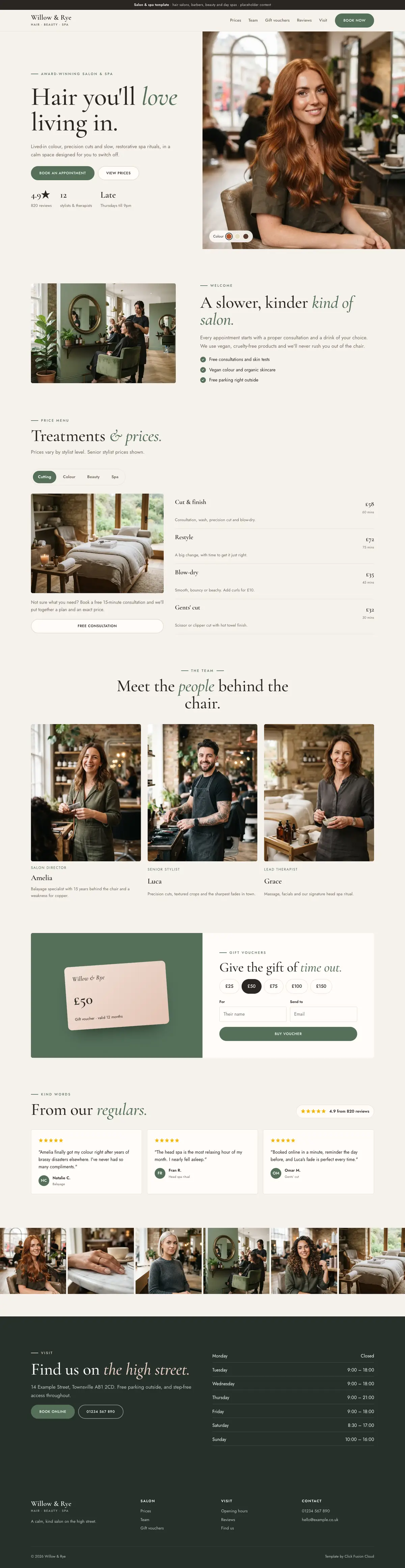
Here is the full homepage of our salon template, Willow & Rye, from top to bottom. Scroll inside the frame. Everything this guide covers is on the one page: a booking button and a prices button in the first screen, the star rating and review count beside them, a price list split into tabs with times and prices, the team with what each person is known for, gift vouchers, real reviews, a photo strip, and opening hours with the address at the bottom.
Salon website checklist
- Booking button on every page, fixed on mobile, using your platform's direct link
- Deposit and cancellation policy in plain words, matching your booking settings
- Full price list as text, with appointment lengths and stylist levels
- A profile for each stylist or therapist, with their reviews and a button to book them
- A gallery of your own work, grouped by service, posted with clients' permission
- Patch test rules on the colour and booking pages, and the test bookable online
- Address, map, parking, access and opening hours that match Google exactly
- Booking set up on your Google Business Profile
- Instagram shown as a few fast images, not a heavy live feed at the top
- A page for each main service, with the town in the title
A salon site doesn't need to be large. It needs to answer the five questions quickly and put the booking button wherever the client's thumb is. Click Fusion Cloud is a web design studio based in Hertford, Hertfordshire, and our web design service starts with a fixed quote if you'd like help with yours.
Quick answers
What should a salon website include?
A booking button on every page, a full price list as text, profiles for each stylist or therapist, a gallery of your own work, patch test and aftercare information, and your address, parking and opening hours. Each main service should also have its own page so it can rank locally.
Which booking system is best for a UK salon?
There's no single best one: Fresha, Treatwell, Booksy, Phorest and Timely all take online bookings and can take deposits on at least some plans. The main difference is how they charge, especially for new clients from their marketplaces, so choose the one that suits how you get clients and use its direct booking link on your website.
Can clients book a salon appointment from Google?
Yes. You can connect a booking provider through the Bookings section of your Google Business Profile, often called Reserve with Google, or add your own booking link once your business is verified.
How far ahead should a patch test be done before a hair colour?
The NHBF's guidance is at least 48 hours before the service, because an allergic reaction can take up to 48 hours to develop. Say this on your colour and booking pages and let new clients book the test online.
Want this done for you?
Website Design & Development from Click Fusion Cloud
Built by our studio in Hertford, Hertfordshire, for businesses across the UK.
See our website design and development service